
What’s Up Doc? My Love/Hate Relationship with Document Camera Read Alouds

A few years ago at an ALA conference, I was talking with a librarian friend when the topic of document cameras came up.
I said I never used one. My librarian friend replied with something along the lines of “It’s life-changing.” But I still resisted.
ADVERTISEMENT
ADVERTISEMENT
I wasn’t interested in using a document camera for a couple reasons:
- I worried that using the camera would position me in a way where it was sort of disorienting for kids to hear me read. I was used to my voice being right in front of everyone, but if I was using a document camera, I might be off to the side or even behind students. I didn’t like the idea of that.
- I thought that it was adding another screen to the lives of kids (and let’s face it, this isn’t solely a kid issue) who have a lot of screens in their lives. I didn’t like adding to that.
But then a some things happened this school year that made me tentatively see if the experience of using a doc camera would be life-changing.
First, I have a couple classes that are big. We have a cool story area in our library (check it out in this post), but as soon as classes start pushing 30 students, it can still get difficult for everyone to see me holding a book.
Secondly I started having read aloud injuries.
Yes, read aloud injuries – elbow and shoulder problems from awkwardly holding large books at weird angles for long stretches of my day.
So I asked our tech person if they could set me up with a doc camera so I could give it a shot.
Here’s the rig:
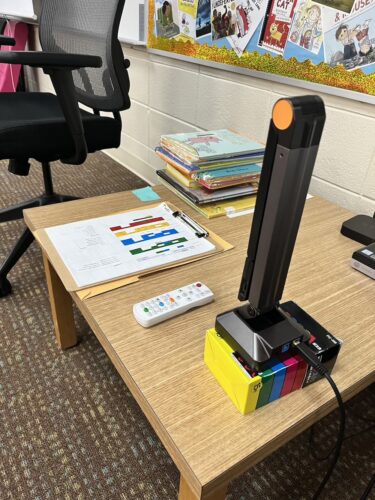
It’s sitting on a box of Posca markers because I needed to lift it up a bit to capture the entire spread of larger books. It’s very portable, which is great.
It has a really long cord, so after a class arrives, I move it over on top of shelves. Like so:
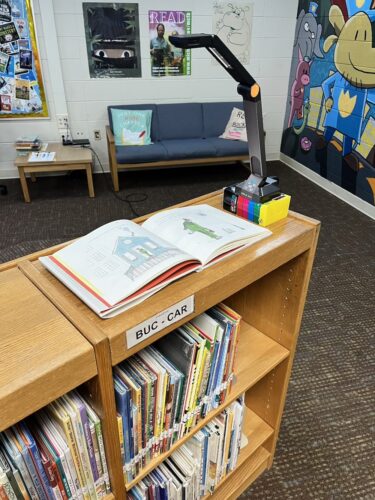
And when it’s all up and running it looks like this:
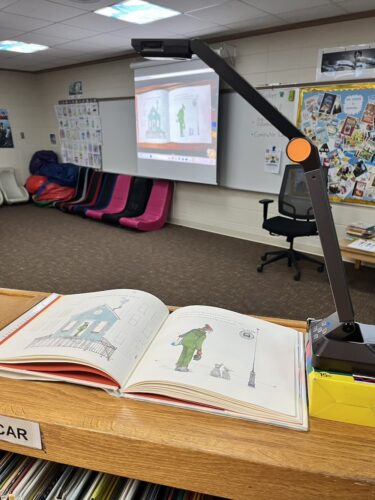

I’ve been using it often (not for every class) for the last couple months and here are the pros and cons:
Pros:
- It’s nice for the fact that I know every single student can see what’s going on in the story.
- It makes the illustrations very big, so I can point stuff out that might normally be too small for a large group to see.
- Standing while I read. I like this more than I thought I would.
Cons:
- I’m forced to read the story from behind the students. Overall this has worked out pretty good, but there are times when being in students’ sightline is helpful.
- I still don’t love that it’s another screen. But at least it’s a screen with a really good book on it.
So while my relationship is still a bit love/hate, I’m sticking with the document camera for now.
Do you use one? Do you have a different setup you like better? Share in the comments!

Join 2,000+ librarians! Subscribe to my newsletter on Substack
Filed under: Articles

About Travis Jonker
Travis Jonker is an elementary school librarian in Michigan. He writes reviews (and the occasional article or two) for School Library Journal and is a member of the 2014 Caldecott committee. You can email Travis at scopenotes@gmail.com, or follow him on Twitter: @100scopenotes.
ADVERTISEMENT
ADVERTISEMENT
SLJ Blog Network
Publisher Preview: Tapioca Stories (Spring & Fall 2026)
Iron Man: Super Smash! | Review
From Policy Ask to Public Voice: Five Layers of Writing to Advance School Library Policy
Fast Five Interview: Shreya Davies and Vanessa Wong
ADVERTISEMENT
I’ve been using one for years and LOVE it. Everyone can see the pages clearly, which means there’s less fidgeting overall and fewer issues with kids creeping up to the front/blocking each other’s view/fighting over a prime bit of floor real estate/sneezing in my open mouth/etc.
We purchased an inexpensive sit/stand mobile desk from Amazon, similar to this model:
https://www.amazon.com/dp/B08317QPQH/ref=sspa_dk_detail_6?psc=1&pd_rd_i=B08317QPQH&pd_rd_w=Hrmzs&content-id=amzn1.sym.386c274b-4bfe-4421-9052-a1a56db557ab&pf_rd_p=386c274b-4bfe-4421-9052-a1a56db557ab&pf_rd_r=ATSKF6ZRBXB9BH6Z3A82&pd_rd_wg=RgvCd&pd_rd_r=87112d2e-a563-4883-b154-9206d2666fc4&sp_csd=d2lkZ2V0TmFtZT1zcF9kZXRhaWxfdGhlbWF0aWM
I can put the document camera on the top shelf and the book on the bottom shelf. Since it’s on wheels, we can store it out of the way and easily position it when it’s time for the readaloud. I’m always able to face my storytime audience, which definitely improves the experience for everyone.
One of the things I like about it, compared to using scans of book pages, is that kids can still see me interacting with the book while I’m reading. I can point things out in the illustration and they see my hands turning the pages. It’s the same experience of sharing a physical book, but magnified to a more accessible scale for a large group.
Much of the research I’ve found on screens emphasizes that the negative outcomes associated with screens can be significantly mitigated if the viewing is paired with interactions between the child and an adult. Given how interactive the average librarian readaloud is, I feel pretty good about our collective ability to provide an overall beneficial experience–even with a screen. 🙂
I’ve just scanned the books to a PowerPoint and used that; seems to work well, esp. if you are going to use the book again. It’s nice to have a folder full of books to use again.